
Let’s face it, we all have a lot on our plates. In a world dominated by digital communication where requests and deadlines are flying from draft to inbox, it feels impossible to keep track of everything that needs to get done.
The same goes for education, especially in an online interactive media program. The lack of day-to-day structure that is typically associated with an in-person curriculum, plus the natural chaos of the digital media field, puts a heavy emphasis on the need for effective organization.
Organization ensures that goals are achieved, deadlines are met, and risks are minimized. While many of us like to tell ourselves that the traditional methods of pen and paper to-do lists are sufficient, this is rarely the case. What do we do when there are multiple people working on a project that need access to the timeline and files?
Today, project management software has become a widespread necessity. Whether for personal, educational, or professional use, these platforms play a central role in the practice of working smarter rather than harder. I’m not proud to admit that I’m one of the people who believed that keeping a meticulous record of school assignments in my weekly planner constituted as proper organization. I would even look forward to the gratification I felt when crossing off completed assignments in my red pen.
The graduate school environment of precise deadlines and balancing multiple projects at once has taught me that I need to do better. So, I’ve taken my plate of responsibilities online, and joined Notion in an effort to improve my planning and productivity.
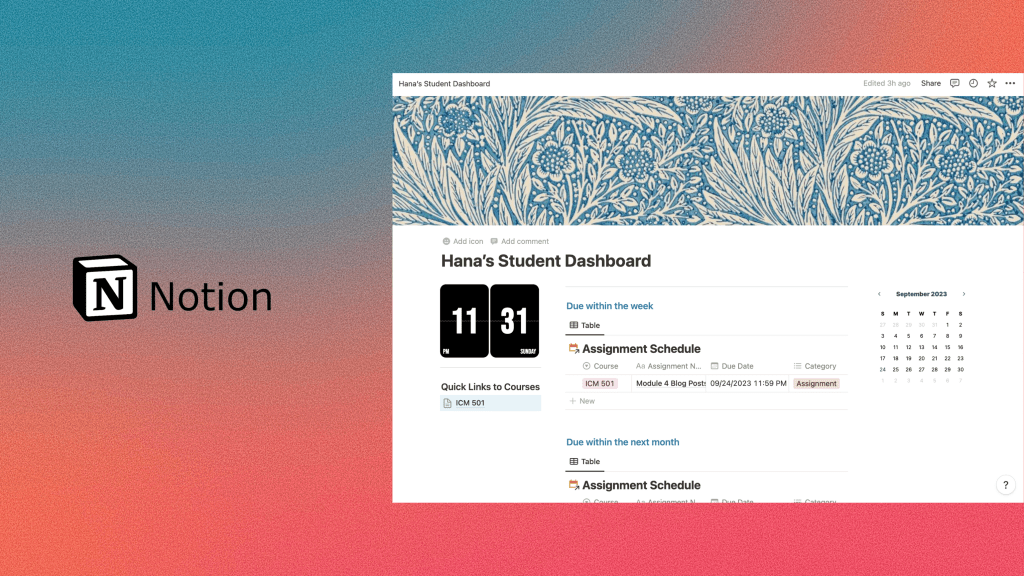
I started my account earlier this week, having been amazed by how visual every aspect was designed to be. On my own dashboard, I’ve implemented an overview of my program where I can easily see which assignments have the nearest due dates and which upcoming ones I can start preparing for. The easy navigation to specific courses grants me access to quick links with everything from assignment schedules to a grade tracker, and to the Zoom link we use every Tuesday for synchronous meetings. Within the trackers, I can see all the subsets and working parts of my projects. I’ve embedded links to helpful articles, deadlines down to the exact times, and status bars that display whether a task has not yet been started, is in progress, or is done. For every feature I’ve begun to discover, Notion seems to have hundreds more.
Below is a short tour of how I set up my Notion account:
With only a week of this system under my belt, I can confidently say that it has greatly changed my organization and workflow. I now have comprehensive project scopes that guarantee objectives are being met in a timely manner. Next week, I plan on looking into whether the software is able to send notifications of task reminders.
As I continue to explore Notion, I’d love to hear of any tips, tricks, or advice for maintaining a strong project management proficiency. If you have any, please leave them in the comments!
 Hana Lataille
Leave a comment